I make no claims to be a tech expert. I’m just a lady with a blog who writes funny stories about my kids and is hoping to parlay that into a writing career. (So far this plan is going surprisingly well. Don’t let the powers that be in on our little secret that I have no idea what I’m doing, k?)
Lately I have had “quite a few” people tell me they were interested in starting a blog and ask if I would give them tips on how to get started… Okay. Fine. You win. It was only two. Two people asked recently and one more asked a few months ago. Regardless, I know a lot of other people have the same question, so I thought I would spend some time focusing on it today.
The first thing people need to decide when they are starting a blog is if they want to use Blogger or WordPress, the two main platforms available.
I will tell you that I started out on Blogger and I loved my little site over there for several reasons. I stayed over there for years.
WHY I LOVED BLOGGER:
- It is very user-friendly. Anyone can set up a site in a matter of a few hours, sometimes less.
- It’s free
- It’s easy to customize. There are tons of great resources on Etsy for very affordable customization options or you can easily design your own headers, buttons, etc. in a software program like PicMonkey.
- The community is nice. It is easy to follow other blogs right from the reader on your dashboard. The people who use Blogger tend to comment on each other’s posts more often, participate in link parties, and just check-in regularly, in my experience.
- You can pay to have the .blogspot removed from your name and make yourself appear more professional. I know A LOT (I have connection, yo. Actually, what happened was I somehow managed to weasel my way into a book with several of them.) of very successful writers who use Blogger and it works for them on a professional level. These ladies use Blogger and are still swimming in money a la Scrooge McDuck. I actually do personally know-because of my involvement as the founder of the BlogU conference- several prominent writers who get literally millions of pageviews per month who are very loyal to Blogger because it is free and can handle their traffic.
- You don’t have to worry about things like plug-ins and widgets, for the most part. Google owns it, which helps with the usability, and it is very easy to track your stats and create your design. It’s simple to use upfront AND it is easier to customize, in my opinion.
Blogger is perfect for you if you just want to start a small family blog or if you are a small business or a student.
Having said all of that, I still made the choice to switch to WordPress last year. There was a BIG learning curve for me. For starters. I learned the hard way that WordPress.com is TOTALLY DIFFERENT than WordPress.org.
IF YOU ARE GOING TO GO WITH WORDPRESS, YOU WANT TO BE SELF-HOSTED ON WORDPRESS.ORG!
I’m sorry I yelled at you. I just can’t stress that enough. WordPress.com was nothing but a big headache for me. You can only use certain templates, so if you have a specific design in mind, you can’t do it and it is just very limiting all-around. It was not a good match for a creative type like me. They also do not allow sponsored content, so you can’t make money. However, WordPress.com is free, so it does have that going for it.
If you want to be self-hosted on WordPress.org, which tends to be what all of the pros recommend, you need to know some things up front:
- Make the switch early. It is a big pain in the neck to switch from Blogger to WordPress if you are keeping track of your stats. If you work with sponsors your stats are very important. When you switch you will basically be building your following from scratch. It is not fun and it takes a while to regain momentum. If you think you may ever want to become one of the “big guns” and turn blogging into more of a career than a hobby, just start on WordPress from the beginning.
- Have a budget. It can be kind of expensive in comparison to other options. (Because the other options are free.) You will need to purchase a domain name and hosting and a good theme. I like the Genesis theme because it has a lot of nice child themes that fit my style and it has some great plug-ins.
Now that I am over the initial learning curve for WordPress I am glad that I made the switch.
REASONS I LOVE WORDPRESS:
- The plug-ins. Think of a way you would like to improve your blog. There’s a plug-in for that. I never even thought of SEO before switching to WordPress, but now I use the SEO by Yoast Plug-in to optimize every post and it makes a big difference in my traffic. I also like Jetpack and the social sharing plug-ins.
- It’s social media friendly. It’s VERY important to have options for sharing on social media on your posts and it is much easier to do that with WordPress. I have plug-ins that puts options for sharing my posts to Facbook, Twitter, Google Plus, and Pinterest with one click. (This feature has been updated on Blogger since this post was written.)
- Less spam. SOOOO much less spam. I get at least 30 emails every day from anonymous commenters on my Blogger blog trying to hype their diet pills or whatever. I’ve been blogging on WordPress for about 7 months and I think I’ve only gotten about 5 spam comments.
- Connecting to readers. It’s much easier to find a reader by clicking on their name in the comment they left on your blog and getting an email address than it is to get in touch with the readers who comment on Blogger blogs without any contact information in their profiles. I find that it is a little easier to build an internal community with the people who read my blog now, but WordPress users tend to be on their own little islands and it is harder to find connections between bloggers, if that makes sense. I think it has a lot to do with the dashboard not having a reader on it. Now I have to seek out other blogs to read and I often forget to do it because they just aren’t right there in front of me like they used to be. WordPress users also tend to be more “seasoned” and focused on their own blogs and will not usually return a comment for a comment, as was a little more common when I was on Blogger. However, it is easier to see a response from a blogger using WordPress because it will often be emailed to you that you were given a reply on a comment you left on someone’s post. On Blogger if you left a question on someone’s blog, you had to remember to keep going back and checking to see if they answered you. If they sent you a private email response, no one else who read the post and had the same question would get to see the answer.
- Expanding your reach. In the 7 months since I’ve switched to WordPress I have seen my traffic and following expand to about 10x more than it used to be. A lot of that has to do with my own networking, but I attribute a great deal to the WordPress SEO and social media factors above.
- You own it. Kayla of Sweet Anne Designs recently pointed out in a discussion about this very topic that she would not feel comfortable setting up a client on Blogger because Google owns your site if it is hosted on that platform and they could possibly decide to shut it down in the future (re: the recent Google Reader fiasco). If you are self-hosted, you own your own site and you have all the control and peace of mind that comes with that.
I like to think of the difference between Blogger and WordPress as the difference leasing and buying a car. With Blogger you are just leasing your website from Google, you don’t actually own it. With WordPress, it is completely 100% yours to do with as you please. There have been cases where blogs have been marked as spam and removed from Blogger for months. If your blog is a main source of income for your family, that is a serious problem. I’m not a lawyer, so I’m not here to give you business advice, but I do I do think that it’s preferable, at least for me, to have complete ownership in every aspect of my company.
However, there is a much bigger cost factor involved with WordPress, especially as your blog starts to grow. Once your traffic reaches the point where you need to move to a dedicated server, you should be prepared to spend anywhere between fifty to several hundred per month in addition to your domain and hosting fees. That is the trade of for the security of ownership.
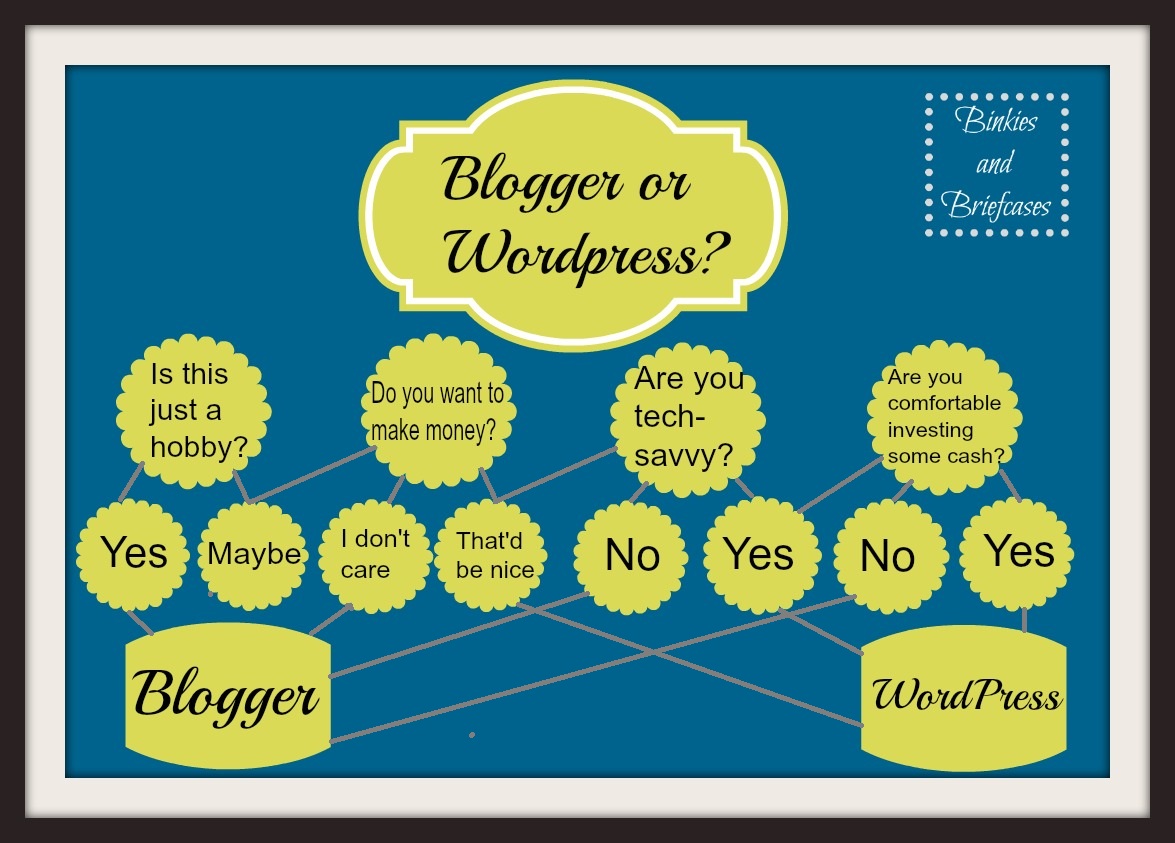
I made this handy-dandy chart for those of us who like visuals.
That’s pretty much all I know. I hope it helps a little. 🙂




I’m getting ready to make the switch, so thanks for the tips!! Glad to hear that the spam isn’t as bad on WordPress…nothing crappier than getting all excited that someone made a comment and then realizing they are a spammer.
Oh, you poor thing. That is a stressful time. I do think it was worth it in the end though. Good luck!!!!
Thanks for sharing this with me! I appreciate the advice. It seems like the majority say that switching is a little confusing at first, but worth it. I think I’m going to make the investment and switch.
I thought this was interesting. Thanks for breaking it down. I’m on Blogger, b/c with the traffic that I have, WP was going to cost me a fortune. I’ll take my chances with Google and hope they don’t shut me down. If they do, I own the URL so I can always open up somewhere else. In the meantime, I’d rather stay with Blogger and pay nothing.
Yeah, I imagine you’d be paying out the wazoo for hosting on WP, unfortunately. Especially this time of year with the popularity of your elf post!
I so agree on all of this. I was going to ditch my blogger site when I get fancy and got my wordpress site.. I decided I would keep both. I am a glutton for punishment apparently. I wanted more of my content separate from my reviews and giveaways, and I also didn’t want to lose clients for reviews because I had no hits. It took me a long time to get the blogger to where it is..
There IS apparently a WP plugin to list the posts on your pal’s sites. I loaded it but haven’t figured out how to make it work. I am a little slow on some things.. lol. Someone probably needs to post about that..
http://www.itzybellababy.com